Learning Management Planner
Research-backed LMS planner grounded in 38 real platforms — forces the right questions before your agent writes a line.
The problem this kills
Every LMS build done with a bare prompt ends up with the same four defects: course content stored as a flat file list instead of a real module/lesson hierarchy; learner progress that disappears on refresh; quiz scores that are never tied to attempt records or feedback; and reports that are parallel counters, not derived from the actual learning events in the database. The agent that built the app had no idea what 38 real LMS platforms actually do at each decision point, so it guessed, and the guesses were wrong in the predictable ways.
The result is a "course CRUD" app that passes a demo and fails real use on day one.
Why your agent cannot fake this
This planner encodes what 38 real LMS platforms actually ship across five source families: live SaaS creator platforms (TalentLMS, LearnWorlds, Thinkific, Teachable, Kajabi), open-source and academic LMS (Moodle, Canvas, Open edX, OpenOLAT, Chamilo), marketplace scripts with authenticated demo access (Academy LMS, Rocket LMS, LMSZai, Faculty LMS), enterprise RFPs and feature comparison PDFs, and practitioner pain threads. The feature inventory assigns a frequency count and tier to every capability row against that denominator of 38 sources.
Your own agent could speculate that "course builder" and "progress tracking" are important. It cannot produce "course builder with visible module/section/lesson hierarchy found in 32 of 38 reviewed platforms, and flat file CRUD is not sufficient" without redoing the scrape. It cannot produce the exact list of 15 failure modes that marketplace scripts inject into otherwise simple builds, or the precise forbidden-family scan terms (instructor payout, commission, affiliate, course approval, reviews, wishlist, checkout, coupons, Zoom, BigBlueButton, SCORM, xAPI, cmi5, OpenSesame, Skillsoft, AI tutor) that keep a Basic build from being polluted by marketplace DNA. That specificity is what you are buying.
Proven in a live build-off
This planner has been dogfooded end-to-end: three working learning-management systems were built from it by three coding models — GPT-5.6 Sol, Grok 4.5 and Gemini 3.6 Flash — from the identical planner package, so the results are directly comparable. All three run as live demos you can sign into from this page, and the full audited ranking is published as a PlanSmith benchmark. What we tested is the thing an LMS cannot get wrong: whether one learner can reach another's record, whether a completion is earned rather than asserted, and whether a certificate means anything. The planner is the product; the apps are the proof.
What you actually get
A single guided planning session produces a lean, agent-executable AGENTS.md or CLAUDE.md spec file (under 35 KB for a Basic build) plus a set of split detail files covering locked decisions, scope ledger, roles and permissions, data model, UI contract, workflow map, technical requirements, acceptance tests, evidence map, and numbered build-step files. The planner walks you through seven structured decision blocks before writing a single line of spec.
The generated spec requires the coding agent to build a real learning product: durable progress events tied to completion rules; enrollment records with server-side access checks; quiz attempt ledgers with scores and feedback; reports derived from source learning records rather than UI counters; a learner home dashboard that functions as a continue-learning portal, not a generic four-card shell; and a course player that passes mobile browser QA before the agent marks any step done.
Handover gates are built into every step. The spec requires browser screenshots, console-clean proof, persistence proof after refresh and second session, RBAC probes, export content assertions, and a final readiness label (SHOWCASE_DEMO, INTERNAL_DOGFOOD, HANDOVER_CANDIDATE, or PRODUCTION_BLOCKED) before sign-off.
Coverage
Phase 0 locks Delivery Mode: Showcase demo, Internal dogfood app, or Production foundation. This single decision controls whether demo auth and in-memory state are permitted and sets the proof bar for every subsequent step.
Phase 1 sets First Delivery depth: Basic (7-9 build steps, fastest usable course platform), Moderate (10-14 steps, one or two branch families), or Advanced (marketplace, corporate compliance, SCORM/xAPI, multi-tenant, or integration-heavy).
Seven decision blocks cover: product and tenant model (single creator, organization, school, corporate branch, marketplace); roles and must-love user; course and learning loop scope (catalog, builder, enrollments, progress, quiz-lite, assignment-lite, certificates, announcements, reports); branch selection from ten evidence-grounded families (live/cohort sessions, school gradebook, corporate compliance and recertification, community and discussions, course marketplace and ecommerce, SCORM/xAPI/cmi5/LTI, native and offline mobile, AI authoring and tutor, content library and migration, SSO); visual direction and primary device; stack and hosting blockers; and build execution mode.
A mandatory forbidden-family scan runs before spec generation to ensure that marketplace ecommerce, SCORM runtimes, live-class sessions, corporate compliance, school gradebook weighting, native app modules, AI tutor, content libraries, community moderation, and gamification do not leak into a Basic build unless explicitly selected. The build sequence then follows a nine-step template from foundation and auth through responsive QA, security hardening, and handover audit.
The frequency-ranked ledger.
Real apps this planner built.
Each one is live — sign in and try it. Compare all 3, with their scores →
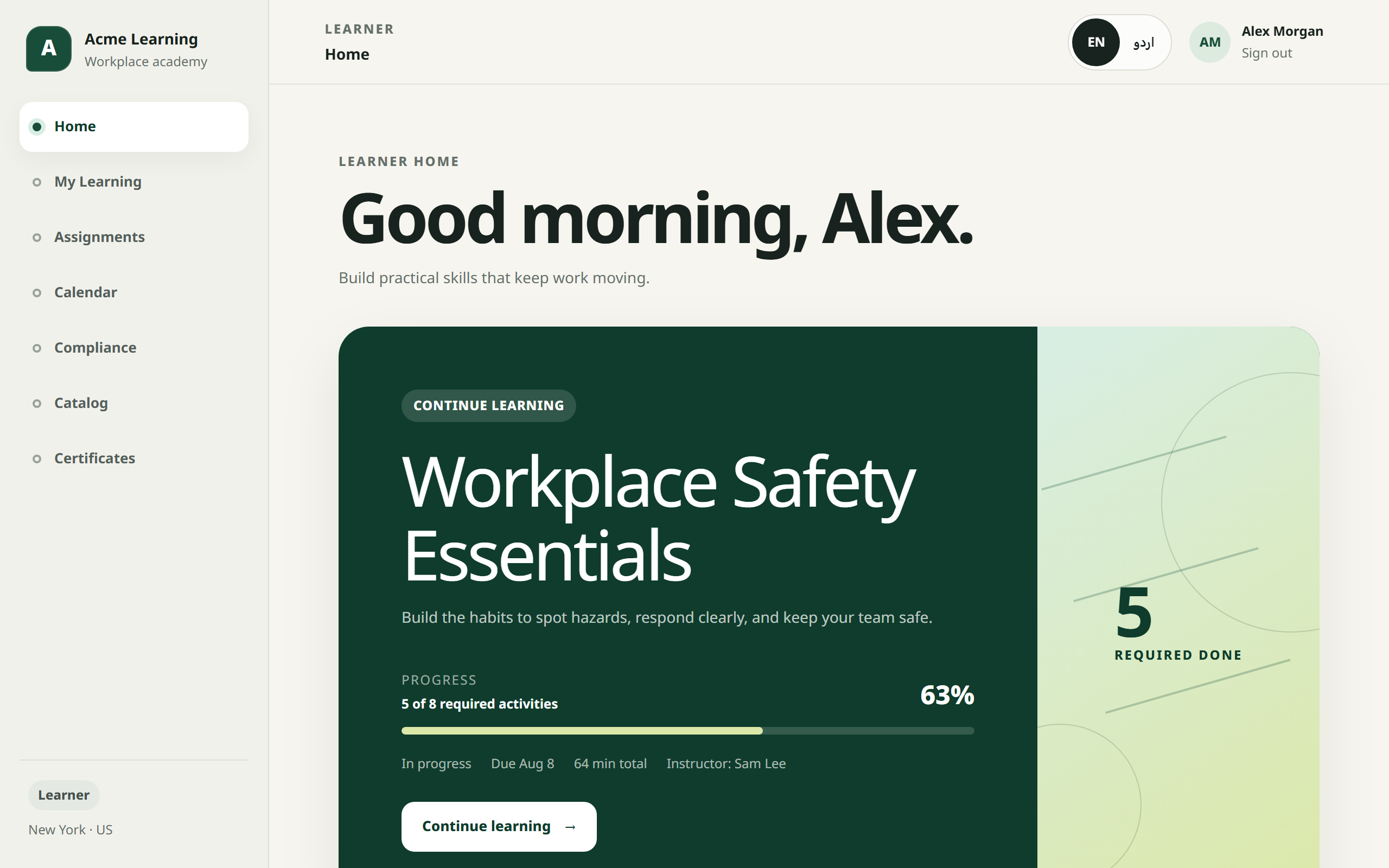
LiveAcme Learning
The top build, and the broadest: seven roles, customer-facing partner academies, SCORM content, and English/Urdu throughout. Permission is a capability matrix rather than a ladder — the academy administrator is deliberately refused the reports and compliance screens that a training manager owns. The partner boundary is enforced both ways: staff cannot reach the customer academies, and a customer manager cannot reach staff reporting. Pick a role on the sign-in screen.
Open live demo →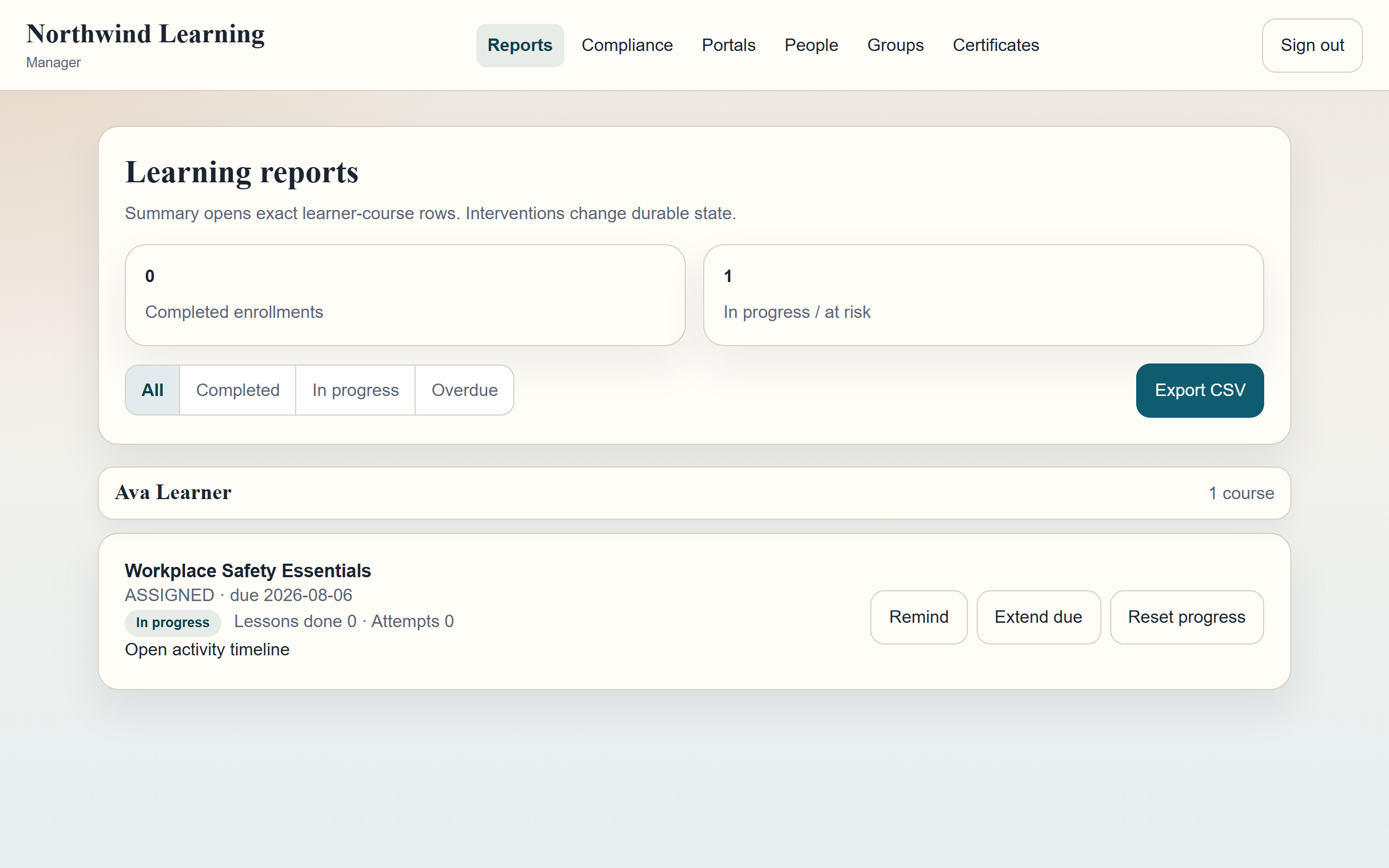 Live
LiveNorthwind Learning
A complete academy in one pass: authoring a course through to publishing it, prerequisite gating, scored quizzes, and a certificate issued automatically on completion. Sessions live in the database and are genuinely revocable, and a learner asking for another learner's record gets a flat refusal in both directions. Sign in as learner@northwind.test / password123, or pick a role.
Open live demo →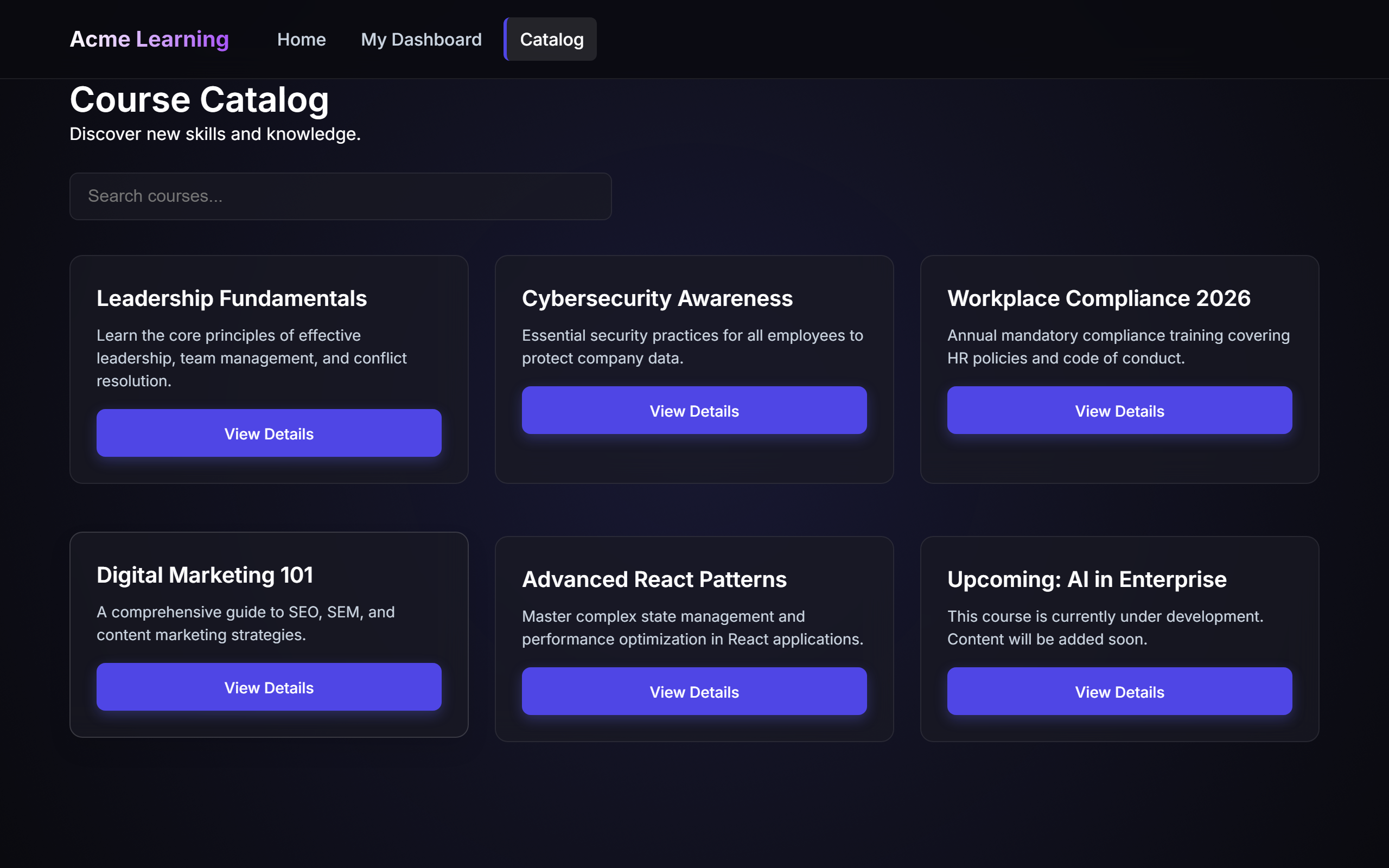 Live
LiveAcme Learning (Gemini)
A fast-tier model's take — a working academy with a real course catalog, enrolments, compliance tracking and certificates. Its session token was originally forgeable, and its demo store was mostly test fixtures; both were repaired after our audit. Pick a role to sign in.
Open live demo →What to know before you build.
- Training tracking in Excel: a template that works, where it breaks, and what replaces it
- Features of a learning management system: the counted list from 38 real platforms
- Open source LMS: what self-hosting actually costs, and when to build instead
- Free learning management system: what the free tiers actually give you