What a retail inventory management system includes (feature checklist from 120 real sources)
Most "inventory management system requirements" lists are guesses dressed up as specs — someone's memory of a demo, padded with whatever the vendor's marketing page happened to bullet. This one is counted. We went through 120 retail-only source rows (Shopify Stocky, Square, Lightspeed, Hike, Loyverse, RetailEdge, KORONA, Erply, Heartland, Epos Now, plus open-source projects and marketplace scripts) and tallied a feature only when a source directly evidenced it shipping — a real screen, a real workflow, a real operational concern. The counts below are directional research evidence, not a promise every product ships all of them; they tell you which features are load-bearing and which are optional, so you can scope a build instead of cargo-culting a feature list.
The other thing this checklist does that a bullet list can't: it tells you, for each feature, the difference between the real version and the decorative one. Almost every retail inventory failure is a feature that exists on screen but doesn't do the work behind it. So each tier below comes with a practical test.
Core Basic — what the smallest useful build actually needs
This is the tier you cannot cheat. Skip anything here and you don't have an inventory system, you have a spreadsheet with a login.
The spine is three features that have to be wired together, not just present:
- Item / SKU master (counted in 24 of 120 sources) — categories, units, tax, cost and sale price. The test: is the item list a thin CRUD table, or does every row carry stock context (on-hand, low-stock state) and link to a detail view? A product list that can't show you the quantity next to the name is a catalog, not inventory.
- On-hand quantity by item and location (32 of 120 — the single most-evidenced feature in the whole set). The test is brutal and non-negotiable: on-hand must be derived from movements and counts, not an editable number. If a user can type a new quantity into a box and hit save, every downstream report is fiction the moment someone fat-fingers a keystroke.
- Stock movement ledger (12 of 120) — the immutable history under the number. Every quantity-sensitive change writes a row with a reason and a source. The test: can you open one SKU and see why it's at 14 units — this receipt, that sale, this adjustment? If not, the on-hand number has no defense.
Around that spine, the rest of the basic tier:
- Manual stock in / out / adjustment with reasons (13 of 120). The adjustment form must require a reason and show before/after quantity. A blank "set quantity" field is the same bug as an editable on-hand — it just moved.
- Opening stock, import, and bulk edit (14 of 120). First setup needs a preview-then-commit import, not a blind upload, and a way to correct starting quantities.
- Full physical stocktake (23 of 120 — the second most common feature). This is the workflow retail staff either love or route around. The test: a stocktake without a variance-review-and-commit step is a spreadsheet with extra clicks. It needs a count session, a computed variance against system on-hand, a review screen, and a commit that writes real adjustment movements — not a silent overwrite.
- Low-stock alerts / reorder points / out-of-stock queue (17 of 120). The test that separates a real queue from a nag: does the low-stock card hand off to create a purchase order, or does it just display a red badge and leave the owner to remember? A low-stock list with no create-PO path is a to-do list the software refuses to help with.
- Reports and export files (21 of 120). Exports have to produce real files with asserted content — a CSV that opens, with the columns you promised. "Export" buttons that download an empty or malformed file are one of the most common fakes.
- Stock command dashboard (14 of 120). The first viewport should surface stock risk: low-stock count, count variance, sell-through, pending POs. The test: every tile drills into its source rows. A KPI you can't click into is decoration.
- Product search and table ergonomics (15 of 120). Dense product tables need filters for category, supplier, location, low-stock, and inactive. On a 4,000-SKU catalog this is the difference between usable and abandoned.
- Audit trail and user activity (8 of 120). Quantity changes and import/receive/count commits record actor, time, and source. Stock is money; "who changed this" is not optional.
Two more genuinely belong in even the smallest build: a store/outlet setup and location model (13 of 120) so single-store today can become multi-store later without a rewrite, and role permissions for owner / stock clerk / cashier (8 of 120), enforced with server-side checks — because the whole point of the movement ledger is knowing a change was authorized.
Core Moderate — the serious single-store build
This is where a real shop's day-to-day lives. None of it is exotic; all of it is where "it demos fine" quietly diverges from "it survives Tuesday."
- Variant / matrix handling (9 of 120) — size/color/style with parent-product grouping. Apparel, gift, and boutique retail are unusable without it; a flat SKU list forces staff to invent naming hacks.
- Barcode / SKU label generation (14 of 120). First-class retail speed feature. (Note: label generation is core; certified printer hardware support is a branch decision — see below.)
- Scan-to-search / scan-to-count (11 of 120). Count and receiving screens need a big scan/search input, not just table filters. The test: does the scan workflow actually resolve a code to a SKU and act on it, or is it a demo that only recognizes the three barcodes in the sample data?
- Supplier / vendor directory (10 of 120). You need supplier records before POs or reorder worksheets mean anything.
- Purchase order lifecycle (24 of 120 — tied with the item master as the most-evidenced workflow). A PO is not a form; it's a state machine: draft → sent → partially received → closed/cancelled. The test: does the PO connect to receiving? A PO that can't be received against is a printable memo.
- Receiving against PO and ad-hoc receiving (18 of 120). Receiving must write stock movements and surface discrepancies and backorders. The failure mode here is the ugly one: receiving that edits the item quantity directly instead of posting a movement — it looks identical on screen and destroys the ledger underneath.
- Partial / cycle count (9 of 120). Let a store count one category or shelf without freezing the entire catalog.
- Damage / shrinkage / loss / return reasons (8 of 120). Shrink should be explicit, categorized reasons — not a generic negative adjustment that hides why the stock is gone.
Core Advanced — richer control and multi-location
Useful, valuable, and the tier most likely to get over-built before anyone's asked for it. Add these when the operation actually spans locations or the owner is making buying decisions off the data.
- Store-to-store transfers (15 of 120). Real transfers have a lifecycle: source, destination, send, receive, variance, history. The test: a transfer that's a fake plus-here/minus-there adjustment is two lies that happen to net to zero — stock in transit is invisible and unreconcilable.
- Incoming / in-transit stock visibility (7 of 120). On-order and incoming quantities kept separate from on-hand, so buyers don't double-order what's already coming.
- Vendor returns (6 of 120). Returns to a supplier are their own workflow — not the same as a customer return and not a generic adjustment.
- Inventory valuation, average cost, margins (9 of 120). Cost and valuation dashboards earn their keep — but the boundary matters: this is decision support, not full accounting.
- Sell-through, stock velocity, dead-stock analytics (12 of 120). Decision-grade insight — what's moving, what's dead, what recently went out of stock — not decorative KPIs.
Branch and Boundary — the "different product" line
Some features are real and requested but shouldn't be default scope, and some belong to an adjacent product entirely. Naming this line up front is what keeps an inventory build from mission-creeping into a POS or an ERP.
Branch (include only when the buyer selects it):
- Multi-location stock controls (17 of 120) — well-evidenced, but it changes every workflow, so it's a deliberate choice, not an accident.
- Pack-size ordering and unit conversion (3 of 120) — cases/boxes/pieces; niche enough that most builds don't need it.
- Certified hardware scanner/printer support (8 of 120) — scan-friendly UI is core; certifying specific hardware is branch work.
Boundary / defer — adjacent, and each is really a different product:
- POS checkout decrement (13 of 120). Inventory integrates with POS, but the checkout screen is not retail-inventory scope.
- Ecommerce / channel sync (6 of 120). Belongs to an omnichannel/ecommerce-inventory planner unless explicitly selected.
- Customer orders / special orders / reservations (4 of 120). Adjacent; don't let them bloat v1.
- Accounting, manufacturing/BOM, and full WMS — these show up in searches but are separate systems. Fold them in and you've quietly signed up to build three products.
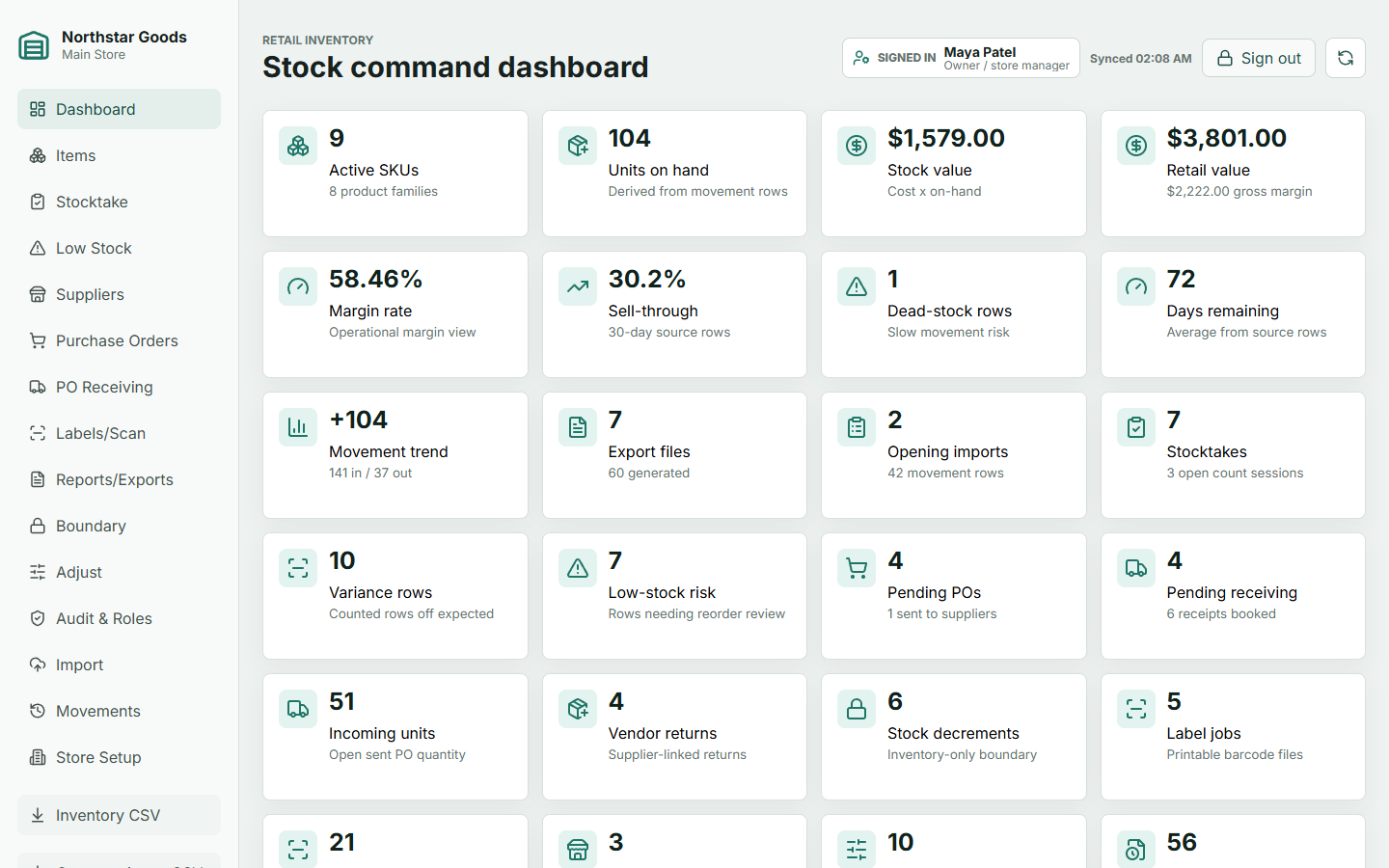 Northstar Goods — every tier in this checklist implemented from the planner's feature ledger, live as a demo on the planner page.
How to use this
Notice the shape of the failures: an editable on-hand, a stocktake with no variance commit, a low-stock badge with no PO handoff, a PO that doesn't reach receiving, a transfer that's really two adjustments. Every one of them passes a demo and fails an audit. The counts tell you what to build; the tests tell you whether you actually built it.
That's the discipline the Retail Inventory Management planner enforces — it walks a coding agent through this exact taxonomy, tier by tier, with the full frequency-ranked feature inventory (all 34 counted rows, sourced) shipping inside for $49, and the boundary line drawn so POS and ecommerce and accounting don't leak into v1. If you want to see what the difference between "demos fine" and "survives an audit" looks like in practice, the build-off benchmark puts several agents' attempts at this same spec side by side.
Further reading
- Still on a spreadsheet? Inventory management in Excel gives you a structure that works and shows where it breaks.
- Looking at free tools first? Free inventory management software covers what the free tiers include and where they stop.
- Deciding whether to build at all? Build vs buy and custom inventory management software lay out the trade.
- Building it? How to build a retail inventory management system covers the sequence, and the database design covers the schema underneath it.